FXhome HitFilm
Показано с 1 по 8 из 8
Опции темы
Поиск по теме
Отображение
FXhome HitFilm
FXhome HitFilm Plugins AE v1.0 CE (Win64)

Подробнее
Исследуйте 3D-вспышки выстрелов, эффекты искажения и деформации, 3D-экструзии, коррекцию rolling shutter, временную манипуляцию и многое другое. Плагины HitFilm станут частью вашего существующего рабочего процесса. Здесь обязательно найдётся что-то для каждого проекта!
HitFilm Plugins includes over 130 plugins:
Blurs:
— Bilateral blur
— Diffuse
— Lens blur
— Motion blur
— Radial blur
— Zoom blur
Channel:
— Channel blur
— Channel mixer
— Channel swapper
— Channel time shift
Color correction:
— Auto color
— Auto contrast
— Auto levels
— Color temperature
— Crush blacks & whites
— Custom gray
— Hotspots
— Pro skin retouch
— White balance
Color grading:
— Bleach bypass
— Day for night
— Duo tone
— Grading transfer
— Hue colorize
— Hue shift
— Shadows & highlights
— Three strip color
— Two strip color
— Vibrance
— Vignette
Distort:
— Bulge
— Chromenator
— Derez
— Displacement
— Insect vision
— Magnify
— Mosaic
— Twirl
— Waves
— Witness protection
Generate:
— 3D extrusion
— Audio spectrum 1
— Audio waveform 1
— Auto volumetrics
— Caustics 2
— Clouds
— Drop shadow
— Fractal noise
— Grid
— Letterbox
— Pond ripple
— Radio waves
— Reflection
— Sphere
— Split screen masking 3
— Tile
— Timecode
Gradients & fills:
— 4-point color gradient
— Color gradient
— Radial gradiant
Grunge:
— Film damage
— Film grain
— Flicker
— Grain
— Half tone
— Half tone color
— Jitter
— Lens dirt
— Noise
— Scan lines
— Shake
— Stutter
— TV damage
Hosts:
— Adobe After Effects CS6 & CC
— Adobe Premiere Pro CS6 & CC
— Sony Vegas 12 & 13
System Requirements:
— Windows 7, 8 (64-bit)
— Hard disk space: Up to 600MB
— Processor: Intel Core i3, Core i5, Core i7 or Intel Xeon (Nehalem)
— RAM: 4GB
— Graphics card: OpenGL 2.0 capable hardware with at least 512 MB video memory ( NVIDIA GeForce 9 Series, Radeon HD 5000 series, Intel HD 4000)
Release Name: FXhome HitFilm Plugins AE v1.0 CE Team V.R private build
Program Type: Video Plug-ins
Release Date: April 2014
Interface Language: English
Requirements: Win64 / After Effects, Premiere Pro CS6 & CC
Размер: 12.12 Мб
Скачать
Сам спросил, сам отвечу, не качать эту версию, а скачать ту, которую я себе только поставил. Никаких водяных знаков и прочей лицензионной ереси

Залил на гуглядиско.


Цветокоррекция здесь на уровне
HitFilm Plugins OFX v1.0.3521.34014 for Vegas Pro (x64)

Исследуйте 3D-вспышки выстрелов, эффекты искажения и деформации, 3D-экструзии, коррекцию rolling shutter, временную манипуляцию и многое другое. Плагины HitFilm станут частью вашего существующего рабочего процесса. Здесь обязательно найдётся что-то для каждого проекта!
Release Name: FXhome HitFilm Plugins OFX v1.0.3521.34014 for Vegas Pro
Program Type: Video Plug-ins
Release Date: 2014
Homepage: hitfilm.com/plugins
Interface Language: English
Requirements: Win64 / Sony Vegas 12 & 13
Размер файла: 19.2Mb
FXhome HitFilm Ignite v1.0.5723 CE for After Effects (Win64)

Подробнее
Исследуйте 3D-вспышки выстрелов, эффекты искажения и деформации, 3D-экструзии, коррекцию rolling shutter, временную манипуляцию и многое другое. Плагины HitFilm Ignite станут частью вашего существующего рабочего процесса. Здесь обязательно найдётся что-то для каждого проекта!
HitFilm Ignite includes over 140 plugins:
Blurs:
— Bilateral blur
— Diffuse
— Lens blur
— Motion blur
— Radial blur
— Zoom blur
Channel:
— Channel blur
— Channel mixer
— Channel swapper
— Channel time shift
Color correction:
— Auto color
— Auto contrast
— Auto levels
— Color temperature
— Crush blacks & whites
— Custom gray
— Hotspots
— Pro skin retouch
— White balance
Color grading:
— Bleach bypass
— Cine style
— Color vibrance
— Day for night
— Duo tone
— Grading transfer
— Hue colorize
— Hue shift
— Shadows & highlights
— Three strip color
— Two strip color
— Vibrance
— Vignette
— LUT
— Vignette exposure
Stylize:
— Cartoon
— Emboss
— Find edges
— Glow darks
— Leave color
— Posterize
— Solarize
— Threshold
— Tint
Temporal:
— Echo
— Motion trails
— Speed
— Time displacement
— Time reverse
Distort:
— Bulge
— Chromenator
— Derez
— Displacement
— Insect vision
— Magnify
— Mosaic
— Twirl
— Waves
— Witness protection
Generate:
— 3D extrusion
— Animated lasers
— Audio spectrum
— Audio waveform
— Auto volumetrics
— Caustics
— Clouds
— Dimension rift
— Drop shadow
— End credits crawl
— Fractal noise
— Grid
— Heat distortion
— Hyperdrive
— Letterbox
— Lightsword (Glow)
— Lightsword (2-point auto)
— Lightsword (4-point manual)
— Pond ripple
— Pulp sci-fi title crawl
— Radio waves
— Reflection
— Sphere
— Split screen masking
— Tile
— Timecode
Gradients and fills:
— 4-point color gradient
— Color gradient
— Radial gradiant
Grunge:
— Film damage
— Film grain
— Flicker
— Grain
— Half tone
— Half tone color
— Jitter
— Lens dirt
— Noise
— Scan lines
— Shake
— Stutter
— TV damage
Scene:
— Environment map transform
— Environment map viewer
— Parallax
— Projector
Keying:
— Chroma key
— Chroma UV blur
— Color difference key
— Demult
— Difference key
— Hue and RGB key
— Luminance key
Lights and flares:
— Auto light flares
— Anamorphic lens flares
— Gleam
— Glow
— Light flares
— Light leak
— Light rays
— Light streaks
— Neon glow
Matte enhancement:
— Alpha brightness and contrast
— Crush blacks and whites alpha
— Erode white
— Invert alpha
— Light wrap
— Matte cleaner
— Remove color matting
— Set matte
— Spill removal
Particles and simulation:
— Atomic particles
— Blood spray
— Fire
— Gunfire
— Lightning and electricity
— Rain on glass
— Shatter
Video clean-up:
— Clone stamp
— Grain removal
— Rolling shutter
Warp:
— Action Cam Lens Distort
— Bezier warp
— Lens distort
— Perspective warp
— Polar warp
— Quad warp
— Spherical warp
— Vortex displacement warp
Hosts:
— Adobe After Effects CC
Minimum system requirements:
— Windows 7, Windows 8, Windows 10 (64-bit operating system)
— 650MB free hard disk space for installation
— Intel Core i3, Core i5, Core i7 or Intel Xeon (Nehalem) processor or AMD equivalent
— 4GB RAM
— OpenGL 2.0 graphics card with at least 512MB video memory (NVIDIA GeForce 9 series, AMD Radeon HD 5000 series, Intel HD 4000). 1GB of video memory is required for 4K projects
Release Name: FXhome HitFilm Ignite v1.0.5723 CE for Adobe AfterFX Team V.R private build
Release Date: Sep 23, 2016
Interface Language: English
Requirements: Win64 / After Effects CC
Размер файла: 15.8 Mb
HitFilm Ignite Pro 2017 1.0.5723 CE (x64) Repack by TeamVR [En]

Состав плагинов:
HitFilm Ignite includes over 140 plugins:
Blurs:
— Bilateral blur
— Diffuse
— Lens blur
— Motion blur
— Radial blur
— Zoom blur
Channel:
— Channel blur
— Channel mixer
— Channel swapper
— Channel time shift
Color correction:
— Auto color
— Auto contrast
— Auto levels
— Color temperature
— Crush blacks & whites
— Custom gray
— Hotspots
— Pro skin retouch
— White balance
Color grading:
— Bleach bypass
— Cine style
— Color vibrance
— Day for night
— Duo tone
— Grading transfer
— Hue colorize
— Hue shift
— Shadows & highlights
— Three strip color
— Two strip color
— Vibrance
— Vignette
— LUT
— Vignette exposure
Stylize:
— Cartoon
— Emboss
— Find edges
— Glow darks
— Leave color
— Posterize
— Solarize
— Threshold
— Tint
Temporal:
— Echo
— Motion trails
— Speed
— Time displacement
— Time reverse
Distort:
— Bulge
— Chromenator
— Derez
— Displacement
— Insect vision
— Magnify
— Mosaic
— Twirl
— Waves
— Witness protection
Generate:
— 3D extrusion
— Animated lasers
— Audio spectrum
— Audio waveform
— Auto volumetrics
— Caustics
— Clouds
— Dimension rift
— Drop shadow
— End credits crawl
— Fractal noise
— Grid
— Heat distortion
— Hyperdrive
— Letterbox
— Lightsword (Glow)
— Lightsword (2-point auto)
— Lightsword (4-point manual)
— Pond ripple
— Pulp sci-fi title crawl
— Radio waves
— Reflection
— Sphere
— Split screen masking
— Tile
— Timecode
Gradients and fills:
— 4-point color gradient
— Color gradient
— Radial gradiant
Grunge:
— Film damage
— Film grain
— Flicker
— Grain
— Half tone
— Half tone color
— Jitter
— Lens dirt
— Noise
— Scan lines
— Shake
— Stutter
— TV damage
Scene:
— Environment map transform
— Environment map viewer
— Parallax
— Projector
Keying:
— Chroma key
— Chroma UV blur
— Color difference key
— Demult
— Difference key
— Hue and RGB key
— Luminance key
Lights and flares:
— Auto light flares
— Anamorphic lens flares
— Gleam
— Glow
— Light flares
— Light leak
— Light rays
— Light streaks
— Neon glow
Matte enhancement:
— Alpha brightness and contrast
— Crush blacks and whites alpha
— Erode white
— Invert alpha
— Light wrap
— Matte cleaner
— Remove color matting
— Set matte
— Spill removal
Particles and simulation:
— Atomic particles
— Blood spray
— Fire
— Gunfire
— Lightning and electricity
— Rain on glass
— Shatter
Video clean-up:
— Clone stamp
— Grain removal
— Rolling shutter
Warp:
— Action Cam Lens Distort
— Bezier warp
— Lens distort
— Perspective warp
— Polar warp
— Quad warp
— Spherical warp
— Vortex displacement warp
Отличия от официальной версии
Не требует активации
Не требует регистрации
Перед установкой необходимо деинсталлировать предыдущие версии программы
Для корректной установки отключить антивирус
Системные требования:
Minimum system requirements
Compatibility
Available for Windows. 64-bit operating systems only. Requires one of Adobe After Effects CC, Adobe Premiere Pro CC
Версия программы: 1.0.5723 CE (x64)
Язык интерфейса: Английский
Лечение: не требуется (инсталлятор уже пролечен)
Размер файла: 15,3 MB
Плагины для Sony Vegas

Sony Vegas Pro имеет широкий набор стандартных инструментов. Но знаете ли вы, что его можно еще больше расширить. Это делается с помощью плагинов. Давайте рассмотрим, что такое плагины и как их использовать.
Что такое плагины?
Плагин — это дополнение (расширение возможностей) для какой-либо программы на вашем компьютере, например Sony Vegas, или движка сайта в интернете. Разработчикам очень трудно бывает предусмотреть все пожелания пользователей, поэтому они дают возможность сторонним разработчикам удовлетворять эти пожелания при помощи написания плагинов (от английского plugin).
Видео-обзоры популярных плагинов для Sony Vegas
Где скачать плагины для Сони Вегас?
На сегодняшний день вы можете найти самые разнообразные плагины для Сони Вегас Про 13 и других версий — как платных, так и бесплатных. Бесплатные написаны такими же простыми пользователями как мы с вами, платные — крупными производителями ПО. Мы сделали для вас небольшую подборку популярных плагинов для Sony Vegas.
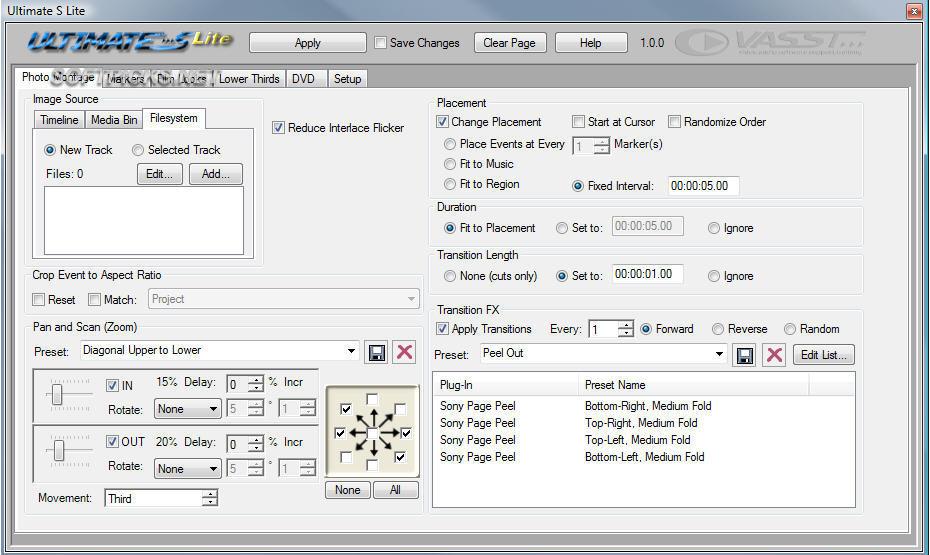
VASST Ultimate S2 — включает в себя свыше 58 утилит, возможностей, и рабочих инструментов, построенных на основе скриптовых плагинов для Sony Vegas. Ultimate S 2.0 несет в себе 30 новых дополнительных возможностей, 110 новых предустановок и 90 инструментов (которых в общей сложности свыше 250) для Sony Vegas разных версий.
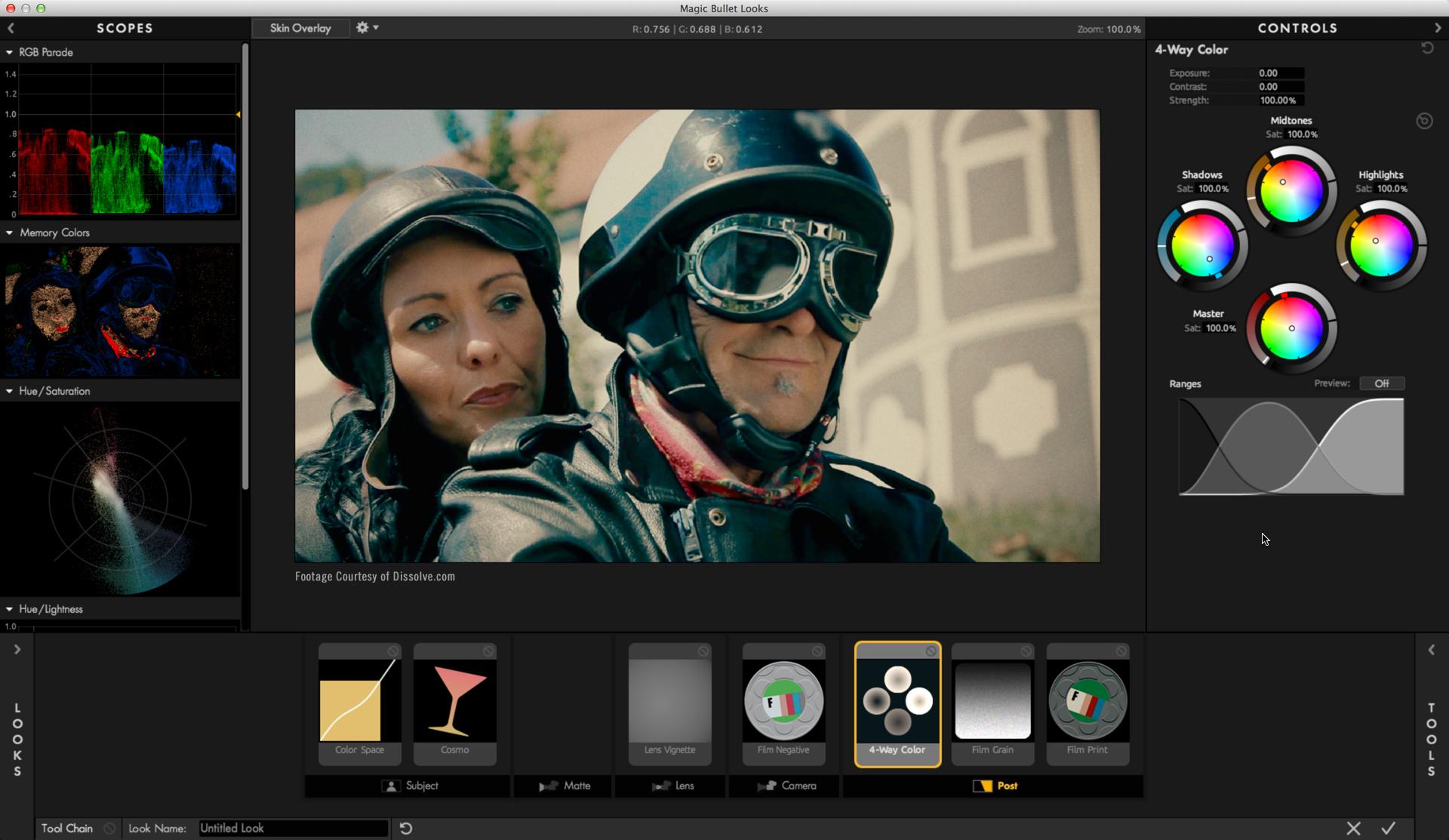
Magic Bullet Looks позволяет улучшать, настраивать цвета и оттенки в видео, применять различные стили, например, стилизовать видео под старый фильм. Плагин включает больше сотни различных предустановок, разделенных на десять категорий. Согласно заявлению разработчика, он будет полезен практически для любого проекта, от свадебного видео до рабочего видеоматериала.
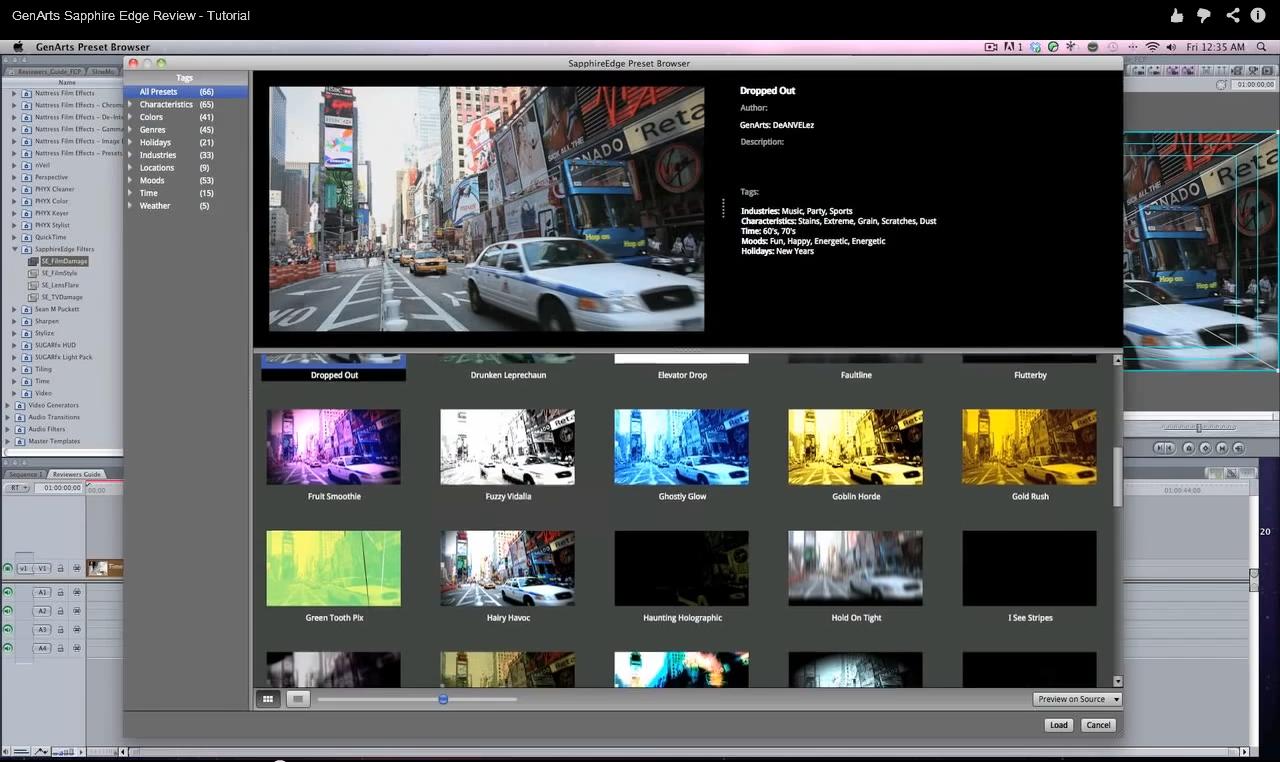
GenArts Sapphire OFX — это большой пакет видео фильтров, куда входит более 240 различных эффектов для монтажа ваших видео. Включает в себя несколько категорий: освещение, стилизация, резкость, искажение и настройки переходов. Все параметры может настроить пользователь.
Vegasaur содержит огромное количество крутых инструментов, которые значительно увеличивают функциональность Сони Вегаса. Встроенные инструменты и скрипты упростят редактирование, сделав за вас часть утомительной рутинной работы, тем самым уменьшив рабочее время и упростив процесс видеомонтажа.
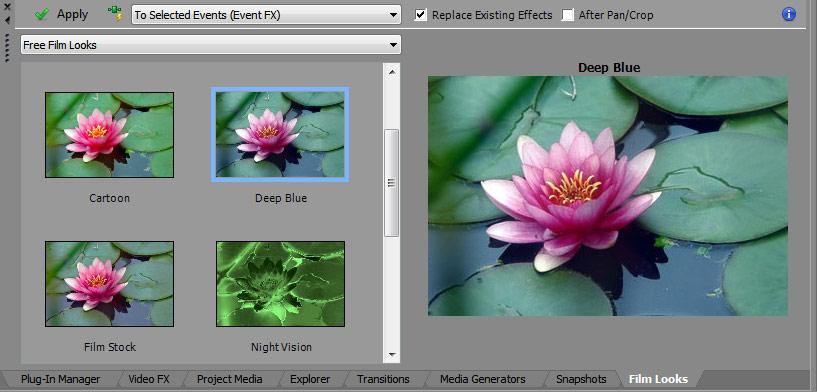
Но не все плагины могут подойти к вашей версии Сони Вегас: не всегда дополнения для Vegas Pro 12 заработают на тринадцатой версии. Поэтому обращайте внимание, на какую версию видеоредактора рассчитано дополнение.
Как установить плагины в Sony Vegas?
Автоматический установщик
Если вы скачали пакет плагинов в формате *.exe (автоматический установщик), вам достаточно указать для установки корневую папку, в которой находится ваш Сони Вегас. Например:
C:\Program Files\Sony\Vegas Pro\
После того, как вы укажите данную папку для установки, мастер автоматически сохранит туда все плагины.
Архив
Если же ваши плагины в формате *.rar, *.zip (архив), тогда их нужно распаковывать внутрь папки FileIO Plug-Ins, которая по умолчанию находится по адресу:
C:\Program Files\Sony\Vegas Pro\FileIO Plug-Ins\
Где найти установленные плагины в Сони Вегас?
После установленных плагинов, запускаем Sony Vegas Pro и переходим во вкладку “Video Fx” и смотрим, появились ли плагины, которые мы хотим добавить в Вегас. Они будут с синими ярлычками возле названий. Если вы не нашли в этом списке новых плагинов, то это значит, что они несовместимы с вашей версией видеоредактора.
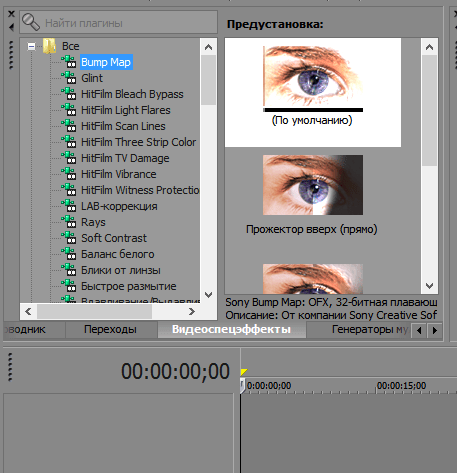
Таким образом, с помощью плагинов вы можете увеличить и так не маленький набор инструментов в Sony Vegas. В интернете вы сможете найти подборки для любой версии Сони – как для Sony Vegas Pro 11, так и для Вегас Про 13. Разного рода дополнения позволят вам создавать более яркие и интересные видео. Поэтому экспериментируйте с различными эффектами и продолжайте изучать Сони Вегас.
Помимо этой статьи, на сайте еще 12523 инструкций.
Добавьте сайт Lumpics.ru в закладки (CTRL+D) и мы точно еще пригодимся вам.
Отблагодарите автора, поделитесь статьей в социальных сетях.
Ofx hitfilm plugin что это


Эдуард Рыльский запись закреплена
 запись закреплена
HitFilm Ignite Pro 2017 1.0.5723 CE (x64)
Исследуйте 3D-вспышки выстрелов, эффекты искажения и деформации, 3D-экструзии, коррекцию rolling shutter, временную манипуляцию и многое другое. Плагины HitFilm Ignite станут частью вашего существующего рабочего процесса. Здесь обязательно найдётся что-то для каждого проекта!
Лечение: не требуется (инсталлятор уже пролечен)
Состав плагинов:
HitFilm Ignite includes over 140 plugins:
Blurs:
— Bilateral blur
— Diffuse
— Lens blur
— Motion blur
— Radial blur
— Zoom blur
Channel:
— Channel blur
— Channel mixer
— Channel swapper
— Channel time shift
Color correction:
— Auto color
— Auto contrast
— Auto levels
— Color temperature
— Crush blacks & whites
— Custom gray
— Hotspots
— Pro skin retouch
— White balance
Color grading:
— Bleach bypass
— Cine style
— Color vibrance
— Day for night
— Duo tone
— Grading transfer
— Hue colorize
— Hue shift
— Shadows & highlights
— Three strip color
— Two strip color
— Vibrance
— Vignette
— LUT
— Vignette exposure
Stylize:
— Cartoon
— Emboss
— Find edges
— Glow darks
— Leave color
— Posterize
— Solarize
— Threshold
— Tint
Temporal:
— Echo
— Motion trails
— Speed
— Time displacement
— Time reverse
Distort:
— Bulge
— Chromenator
— Derez
— Displacement
— Insect vision
— Magnify
— Mosaic
— Twirl
— Waves
— Witness protection
Generate:
— 3D extrusion
— Animated lasers
— Audio spectrum
— Audio waveform
— Auto volumetrics
— Caustics
— Clouds
— Dimension rift
— Drop shadow
— End credits crawl
— Fractal noise
— Grid
— Heat distortion
— Hyperdrive
— Letterbox
— Lightsword (Glow)
— Lightsword (2-point auto)
— Lightsword (4-point manual)
— Pond ripple
— Pulp sci-fi title crawl
— Radio waves
— Reflection
— Sphere
— Split screen masking
— Tile
— Timecode
Gradients and fills:
— 4-point color gradient
— Color gradient
— Radial gradiant
Grunge:
— Film damage
— Film grain
— Flicker
— Grain
— Half tone
— Half tone color
— Jitter
— Lens dirt
— Noise
— Scan lines
— Shake
— Stutter
— TV damage
Scene:
— Environment map transform
— Environment map viewer
— Parallax
— Projector
Keying:
— Chroma key
— Chroma UV blur
— Color difference key
— Demult
— Difference key
— Hue and RGB key
— Luminance key
Lights and flares:
— Auto light flares
— Anamorphic lens flares
— Gleam
— Glow
— Light flares
— Light leak
— Light rays
— Light streaks
— Neon glow
Matte enhancement:
— Alpha brightness and contrast
— Crush blacks and whites alpha
— Erode white
— Invert alpha
— Light wrap
— Matte cleaner
— Remove color matting
— Set matte
— Spill removal
Particles and simulation:
— Atomic particles
— Blood spray
— Fire
— Gunfire
— Lightning and electricity
— Rain on glass
— Shatter
Video clean-up:
— Clone stamp
— Grain removal
— Rolling shutter
Warp:
— Action Cam Lens Distort
— Bezier warp
— Lens distort
— Perspective warp
— Polar warp
— Quad warp
— Spherical warp
— Vortex displacement warp
FXhome Ignite Pro 4.0.8528.10801 for AE and OFX

HitFilm Ignite Pro — Универсальный набор плагинов для After Effects CC и Avid Media Composer/Symphoni, включающий более 140 подключаемых инструментов для визуальных эффектов, работы с зеленым экраном, композитинга, анимированной графики, цветокоррекции и стилизации видео. Эти плагины были выбраны, чтобы обеспечить мощность, гибкость и эффективность видео-производства.
Исследуйте 3D-вспышки выстрелов, эффекты искажения и деформации, 3D-экструзии, коррекцию rolling shutter, временную манипуляцию и многое другое. Плагины HitFilm Ignite станут частью вашего существующего рабочего процесса. Здесь обязательно найдётся что-то для каждого проекта!
Системные требования:
Windows 7, 8, 10 (х64). Intel Core i3, Core i5, Core i7 or Intel Xeon (Nehalem) processor or AMD equivalent, 4GB RAM, OpenGL 2.0 graphics card with at least 512MB video memory (NVIDIA GeForce 9 series, AMD Radeon HD 5000 series, Intel HD 4000). 1GB of video memory is required for 4K projects
Поддерживаемые программы:
Adobe After Effects, Avid Media Composer/Symphoni, OFX программы: DaVinci, Sony/Magic Vegas, Sony Catalist, Nuke.
Что бы увидеть, нужно зарегистрироваться или авторизоваться. Для быстрого скачивания необходимо — ПОЛУЧИТЬ ДОСТУП.
Ofx hitfilm plugin что это
True 3D compositing
Groundbreaking 2D and 3D compositing. Import 3D models. 3D camera solving with mocha HitFilm. Professional keying and color grading.
Unrivalled visual effects
Over 150 pro effects: World class 3D particle simulators. Procedurally generated visuals. Lights & flares. Nothing else comes close.
A revolution in video editing
All your essential editing tools. A revolutionary workflow. Everything you need at your fingertips, in a single product.
Compositing
Design stunning visuals with HitFilm 2 Ultimate’s arsenal of compositing tools. Import 3D models, camera solve with mocha HitFilm, extract professional green screen keys and work in both 2D and 3D. This is Ultimate power.
Work with 3D models
Built-in support for using 3D models inside HitFilm, with lights, shadows, motion blur and depth of field. It’s a revolutionary workflow.
Keying & matte creation
Professional, fully featured chroma key for green screen removal and a wide range of tools for perfecting and enhancing your composites.
Superior 2D & 3D compositing
Combine traditional 2D layer compositing with an advanced 3D workspace and sophisticated animation controls.
2D & 3D tracking
Super-fast optical flow feature tracking plus mocha HitFilm for planar tracking and 3D camera solving. The perfect tracking solution.
Visual effects
HitFilm 2 Ultimate includes over 150 professional effects. Design unique, high quality visuals for your projects with vast customization options and an intuitive interface.
Organic particle arrays
Create stunning, organic, fractal animations with hundreds of thousands of particles. The shapes can even animate automatically to music.
World class 3D particle simulator
3D physics. Dynamic forces. Multiple collision deflectors. HitFilm 2 Ultimate’s cutting edge particle simulator rivals anything else on the market.
Grunge & damage
Age your video with realistic film & TV damage, lens dirt, artificial grain, automatic shake and optical flow motion blur.
Lights & flares
Design your own lens flares and have them lock automatically to the brightest parts of your frame. Create volumetric light rays and anamorphic streaks for beautiful lens effects.
Procedural destruction
Shatter your videos and images into thousands of 3D fragments, add realistic gunfire to your props, create electrical storms and splash blood across your lens.
Video editing
Everything together in one place. Switch between efficient non-linear editing and advanced visual effects at any time, without changing interface. It’ll change the way you think about post.
Essential tools
Ripple, roll, slip, slide, transitions. Unlimited video and audio tracks. Timeline volume & opacity graphs. Responsive trimming.
Finishing & export
Over 20 plug-ins for color correction and grading. Export high quality HD video or upload direct to YouTube from inside HitFilm — couldn’t be easier.
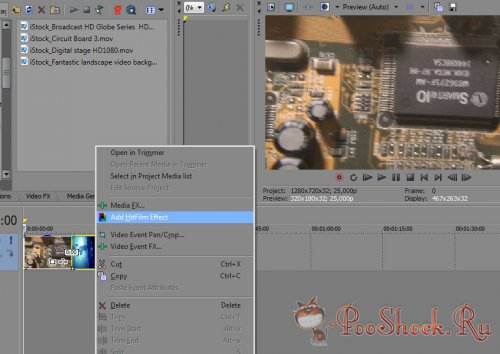
ОС: Windows Vista\Se7en (x64)
Язык интерфейса: Английский
Таблетка: В наличии.
Размер: 161 Mb