Collector
Contents
Collector
Introduction
The Collector is a light-weight agent based on patented technology. It captures and reports network connections, program executions, web requests, and many other activities and properties from the devices of the end-users on which it runs. It is implemented as a kernel driver and accompanying services, offering remote and automated silent installations with negligible impact on the performance of local desktops, while minimizing network traffic.
3kbps on average (dependent on Campaigns, Remote Actions, Updates)
The following figure depicts the role of the Collector within the Nexthink solution.

Collector components
The capability of the Collector for gathering user activity data is shared by the kernel driver and the helper service (or daemon) components. By running close to the operating system, the kernel driver detects some kinds of user activities that are only visible at this level.
Features
Multi-Platform
The Collector is available for both Windows and macOS operating systems. The present documentation states the platforms to which each feature applies. Likewise, the data model details the individual pieces of information collected for each platform.
CrashGuard
Since the Windows Collector driver is a kernel-mode component, any error in its internals or its interaction with a misbehaving third-party driver can lead to system instabilities. Even with Nexthink putting as much attention as possible towards delivering bug-free software, the principle of precaution holds. The CrashGuard feature detects every system crash and, by default, it disables the Collector driver itself if the system crashes more than three times in a row after installation.
Kernel traffic interception
Some applications may send and receive data to and from the network using kernel-mode components, actually hiding their network traffic from user-space monitoring applications. Being a kernel driver itself, the Windows Collector is nevertheless able to detect and report such traffic.
Paths aliasing
The Collector identifies commonly used paths (e.g. C:\WINDOWS\, C:\Program Files\) and other special mount locations (removable mount points, network drives) with paths aliases. For example, if the DVD-Rom drive is mounted under D:, the Collector reports an application setup.exe being launched from this media as %RemovableDrive%\setup.exe.
Reliable connectivity via TCP
When configured to send data through TCP, the Collector relies on the connection-oriented features of the protocol to ensure that the information reaches the Engine.
In addition, when the connection between the Collector and the Engine is lost or not established yet, the Collector is able to buffer up to 15 minutes of data (a maximum of 2500 packets not older than 15 minutes) to send to the Engine once the connection is (re-)established.
Network switching
A change of network interface is transparent to the Collector, except when it invalidates the DNS resolution of the Engine. In the latter case, the process of adapting to a different network may take a few minutes and the Collector resends the whole context to the Engine.
Event logging
Connection events to the Nexthink Appliance and main errors are written to either the standard Windows event logs or the macOS system log.
On-the-fly configuration
The Collector driver parameters can be changed through the Collector Control Panel extension or the Collector Configuration tool. There is no need to restart the computer for the changes to become effective.
Code signed software
To be able to load and run on Windows devices, the kernel components of the Windows Collector are signed with an official Microsoft certificate. Likewise, user-space components are signed with a valid Nexthink certificate.
In turn, the Mac Collector is signed with the Developer ID certificate of Nexthink and follows Apple notarization process to ensure that it can be installed and run seamlessly on macOS devices.
Полевой сбор данных с NextGIS Collector
Технология полевого сбора геоданных, объединяющая Веб ГИС nextgis.com и мобильное приложение — NextGIS Collector.

Смысл фразы не изменился и стал еще более острым и актуальным. В современном мире оперативный сбор и передача информации дают неоспоримые преимущества компаниям и командам по сравнению с их оппонентами и конкурентами.
С момента основания NextGIS в 2011 мы занимаемся проектами, связанными со сбором полевых данных в очень разных областях, от мониторинга строительства ВОЛС по всей России до учета снежного барса в экстремальных условиях Горного Алтая. Накопленный опыт позволил учесть многообразие вариантов и нюансов и создать оптимальную технологию организации процесса сбора данных — NextGIS Collector.
Преимущества NextGIS Collector
Мгновенный старт для участника сбора
Установить приложение, зарегистрироваться и подключиться к проекту сбора. Никаких настроек слоёв и форм, все готово к сбору.
Гибкое и легкое конфигурирование для администратора
Настройка форм, участников, ресурсов – без программирования.
Готовность к работе
Все компоненты технологии готовы к работе прямо сейчас.
NextGIS Collector включает комплекс программ, радикально упрощающих весь процесс организации сбора данных в поле.
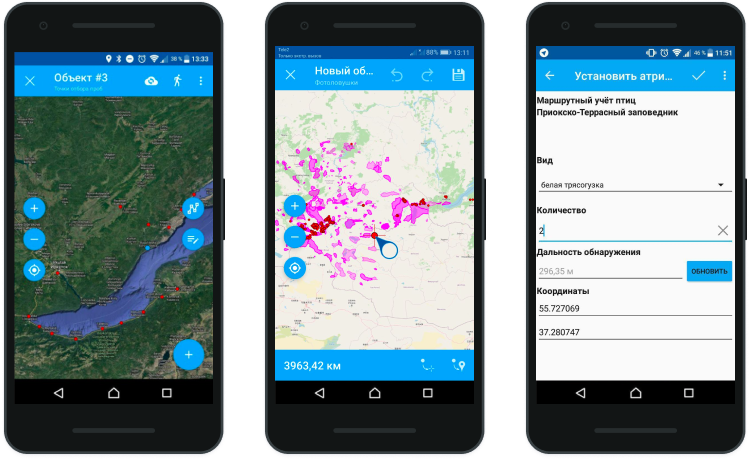
Как работает NextGIS Collector
NextGIS Collector улучшает процесс сбора данных:
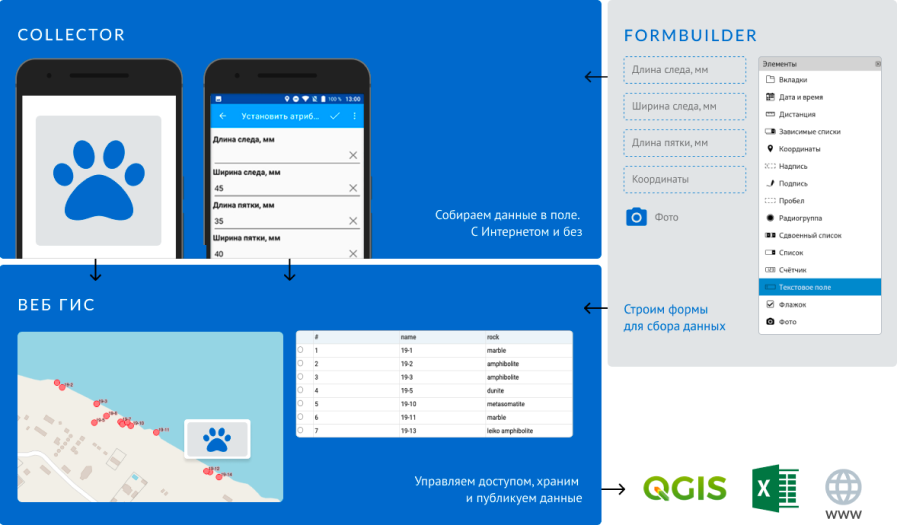
Функциональность
Основное назначение NextGIS Collector — сбор данных с геопривязкой к местности, причем неважно, какая информация включена: фото это, документ или схема, — вся передаваемая информация автоматически включает в себя пространственные данные.
Стоимость
Стоимость включает: 50 рабочих мест, сервер NextGIS Web Extended.
Заключение
Классические способы сбора данных с помощью карандаша/тетради/блокнота остаются, но жизнь не стоит на месте. Для организации процессов все чаще требуются оперативные, готовые для дальнейшей работы, структированные данные, не требующие отдельного ввода и валидации.
Технология NextGIS Collector оптимальна по соотношению функциональность/стоимость и может быть гибко настроена под нужды почти любого проекта.
Напишите нам, если вас заинтересовала возможность использования NextGIS Collector или просто подключайте Premium и начинайте использовать технологию прямо сейчас, поддержка включена!
How Nexthink Works
End users are key to any IT department. Sometimes those end users are external consumers and other times they are employees.
Nexthink focuses on the employee IT experience.


With Nexthink, every employee has a lightweight collector installed on their devices.
These employees could be any where in the world, using any number of devices.

Nexthink then collects activities and metrics such as:
Performance issues, unused software, policy breaches, browser requests and hundreds of other metrics.
This activity is then fed to the Nexthink Engine where it is processed and interpreted in real time.
This data is then aggregated for top level executive consumption in the user-friendly Nexthink Portal and the more granular and robust Nexthink Finder.

The data provided in these two places provides IT, support and operations teams / executives with the visibility and intelligence they need to act on, engage with and remediate the entire employee IT experience.
Применение интерфейса Collector для работы с потоками в реальных Java-проектах
Автор статьи, перевод которой мы публикуем сегодня, хочет рассказать о том, как интерфейс Collector и сопутствующие механизмы используются в реальных проектах.
Представим себе интернет-магазин, в котором есть корзина. Модель корзины выглядит так, как показано ниже.

Здесь и далее в коде будут использоваться комментарии в виде чисел, подробности о которых будут приводиться после блока кода.
В результате — для того чтобы узнать и цену товаров в отдельных строках, и общую стоимость заказа, нам нужно создавать на основе объекта корзины два потока. Из одного мы получаем сведения о строках, из второго — сведения о ценах.
Это — не особенно удачный способ решения нашей задачи.
| Интерфейс | Описание |
| Предоставляет базовый объект, контейнер, используемый для работы с потоком значений. | |
| Описывает порядок накопления в контейнере значений, поступающих из потока. | |
| Если работа ведётся с двумя потоками — описывает порядок их объединения. | |
| Если тип мутабельного контейнера не является возвращаемым типом — описывает порядок преобразования контейнера в возвращаемый тип. | |
| Предоставляет метаданные для оптимизации работы с потоками. |
Теперь мы можем реализовать интерфейс Collector :
Итоги
Код, проекта, который мы рассматривали, в формате Maven, можно найти в этом репозитории.
Пользуетесь ли вы классом Collectors и интерфейсом Collector в своих проектах?
Energizing Work
Employee experience is everything. Understand what your employees need, what works for them and why it works through IT that delights.
At Experience Everywhere ‘21, We’re Revealing Alliances with Leading Technology Players Citrix, HP, and Qualcomm Learn More
What Nexthink Customers Achieve Through DEX
Surge in Employee Net Promoter Score
Improved Employee Satisfaction
A US pharmaceutical company increased employee NPS by 72% in less than 6 months using Nexthink.
50 hrs
IT Downtime Returned to Every Employee
Increased Employee Productivity
ROI Across 3 Years
Hugely Reduced IT Costs
Incidents Averted Across 2 Years
Proactive Problem Management
“We have identified 57k + defects using Nexthink.”
Surge in Employee Net Promoter Score
Improved Employee Satisfaction
A US pharmaceutical company increased employee NPS by 72% in less than 6 months using Nexthink.
50 hrs
IT Downtime Returned to Every Employee
Increased Employee Productivity
ROI Across 3 Years
Hugely Reduced IT Costs
Incidents Averted Across 2 Years
Proactive Problem Management
“We have identified 57k + defects using Nexthink.”
Start Meeting Their Expectations
No matter when or where they’re working, today’s employees expect a great technology experience. What’s the key to making it happen? Having a deep, continuous understanding of each employee’s needs across the entire digital enterprise.




It’s Time for Human-Centric IT
Nexthink Experience, a cloud-native platform, shines a light on all aspects of every single employee’s digital journey. Powered by AI, the platform lets you make more informed decisions, automate and optimize experience.
Discover What They Need
Gain real-time insight into employee activities across devices, operating systems, networks, applications and locations.
See What They Experience
With the platform’s AI, machine learning and advanced automation capabilities, IT teams can easily surface, prioritize and proactively resolve digital problems before they slow down employees.
Know How They Feel
Learn what employees are thinking in the context of their digital activities to reveal unreported issues and opportunities to drive engagement.
Deliver IT That Delights
Correlate employee sentiment with technical insight to continuously enhance the digital experience.
Enrich your IT Ecosystem
Closely correlate Nexthink analytics with other data sources, optimize IT Service Management tools, enhance Service Desk efficiency or enable employee chatbot self-healing.
Trusted By Companies That Put Employee Experience First
IT should be a frictionless experience for employees


The ability to measure is something that’s extremely important to Toyota’s workplace. We want to know that we’re making a difference to the end user’s perceptions


Nexthink reveals eye-opening things we had never seen before




Featured In
Featured In


Even though lockdown in the UK is easing and shops are reopening, there remains a question mark around the timing for the return to the office.
Pre-pandemic, burdened IT departments were relied upon and often beleaguered, but once COVID-19 sent nearly all staff to work from home, the company’s reliance on its IT sector grew exponentially.